A domain health report card for every client, with your logo on it.
Every month, each client gets a two-page PDF they'll actually read: an overall grade from A to F, what changed, and the three fixes that matter most. It's the part of domain and DMARC monitoring your clients see, and the reason they keep paying for it.
No email address needed. The sample is a real card made with made-up data.
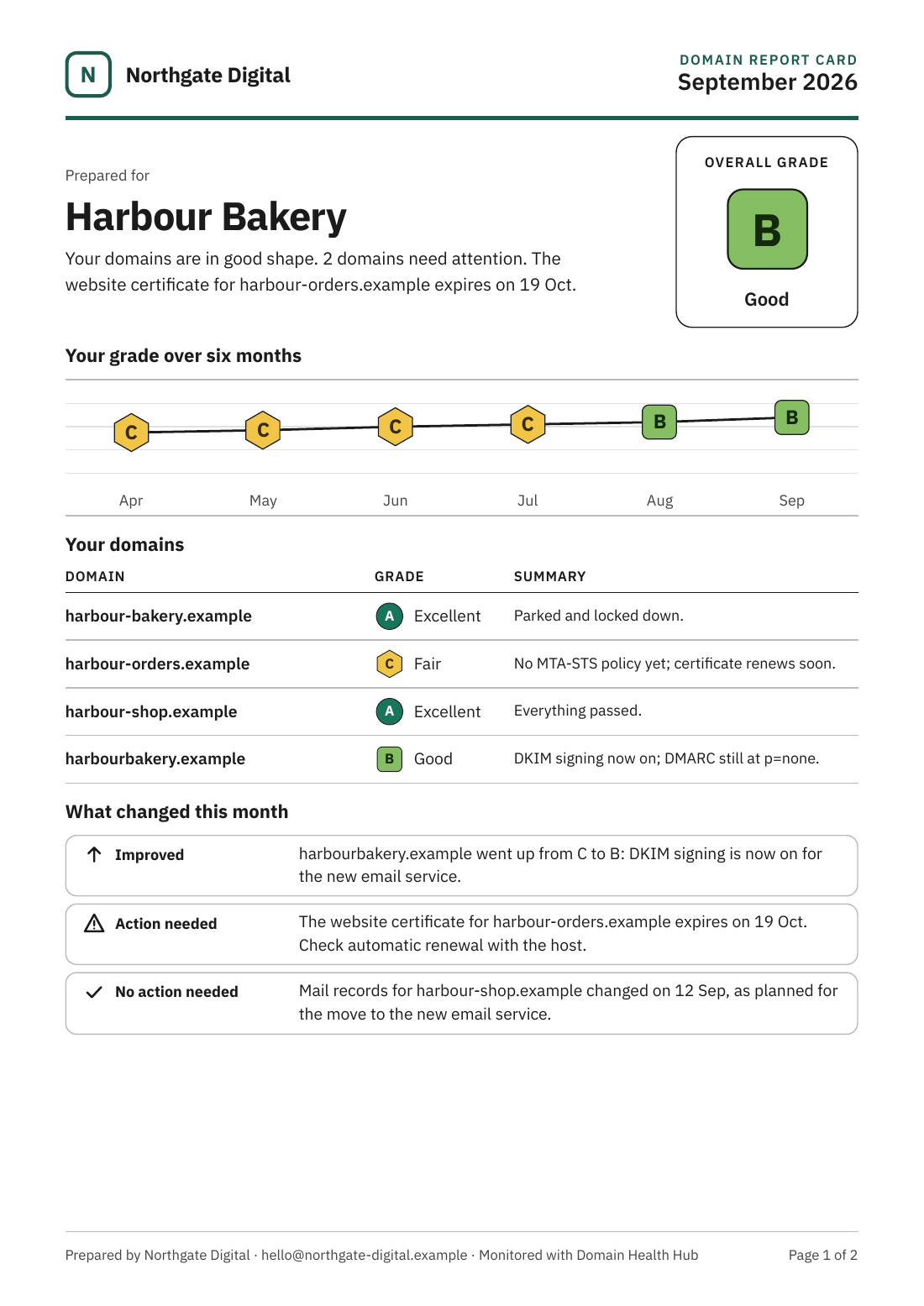
What's on a report cardTwo pages, written for the client, not for you.
Plain English throughout, no jargon without an explanation, and it prints cleanly in black and white. It goes out under your agency's name, so it reads as your report, not ours.
Page 1: how things stand
- The client's overall grade, from A to F, and a sentence on what it means
- How the grade has moved over the last six months
- Every domain with its grade and the most important thing about it
- What changed this month: what improved, what needs doing, and what needs nothing
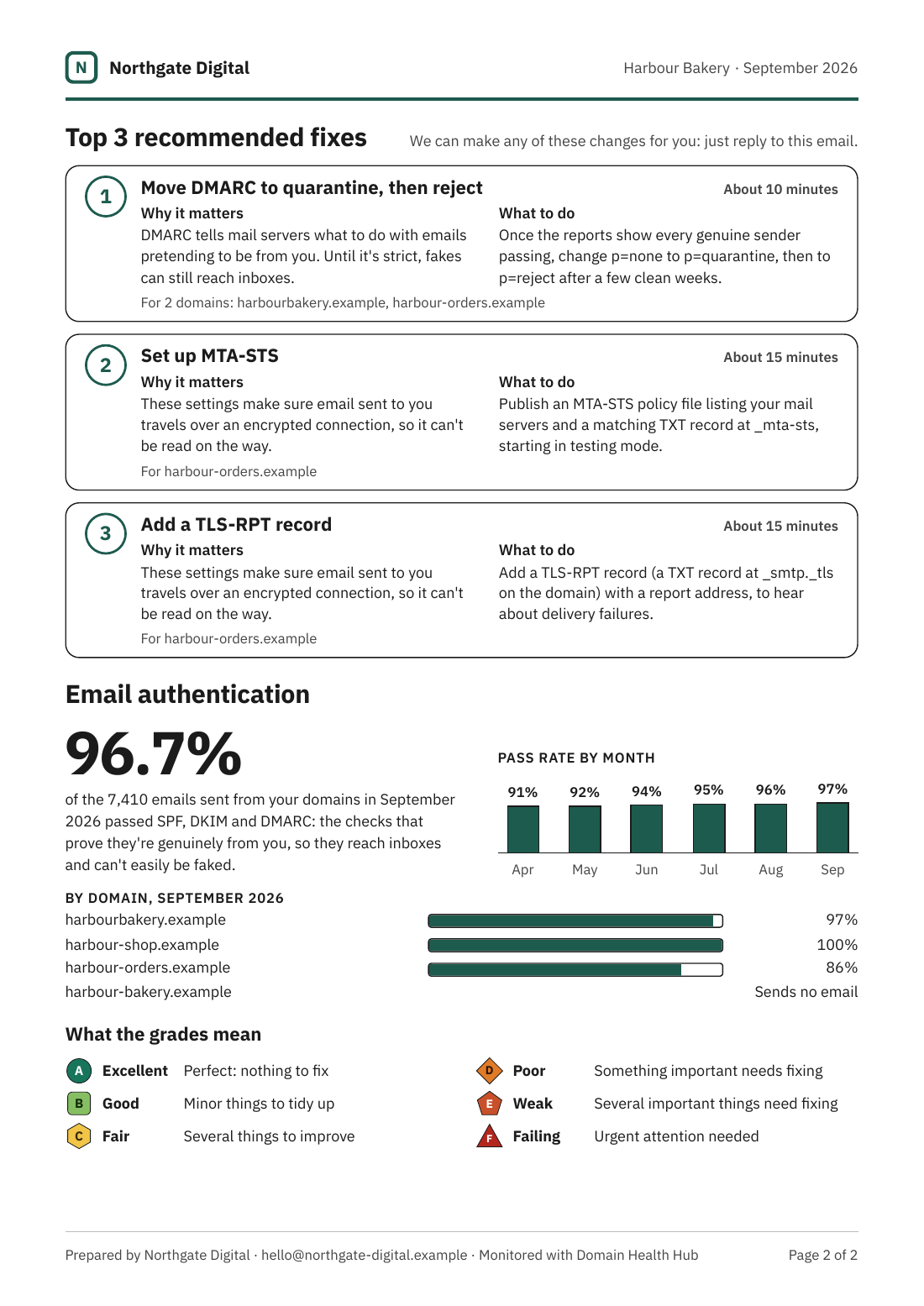
Page 2: what to do about it
- The top three fixes, each with why it matters, what to do, roughly how long it takes and which domains it applies to
- How much of the client's email passed SPF, DKIM and DMARC, by month and by domain
- What each grade means, so the card makes sense on its own
The gradesA to F, and what each one means.
Every domain gets a score out of 100 and a grade. An A means a perfect 100: nothing left to fix. A client's overall grade is the average of their domains. Each grade has its own shape as well as its colour, so it still reads on a black and white printout.
- 100Excellent. Perfect: nothing to fix.
- 90 to 99Good. Minor things to tidy up.
- 80 to 89Fair. Several things to improve.
- 70 to 79Poor. Something important needs fixing.
- 60 to 69Weak. Several important things need fixing.
- Below 60Failing. Urgent attention needed.
E sits between D and F: several important things need fixing, but the domain isn't failing outright. A domain that has expired, or doesn't exist in DNS, is always an F whatever else passes.
How the score worksEmail authentication counts most.
The score comes from the daily checks, weighted by how much each one matters to a client. Checks that don't apply, like HTTPS on a domain with no website, are left out rather than counted against it. Mail servers and DNS changes are shown but not scored.
See any domain's score now, free- DMARCRecord exists and is valid, the policy (none, quarantine or reject), pct, and where reports go.30 points
- SPFOne valid record, DNS lookups within the limit of 10, and no +all or ?all.15 points
- DKIMYour selectors, or common ones we look for. Key present and long enough.15 points
- HTTPS certificateApex and www: expiry (warns at 21 days, fails at 7), a valid chain and a matching hostname.15 points
- Domain registrationExpiry date from RDAP, including .uk domains. Warns at 30 days, fails at 7.10 points
- BlacklistsMail server addresses, and sending addresses seen in DMARC reports, against reputable blacklists.10 points
- MTA-STS and TLS-RPTBoth records present, and the policy file served over valid HTTPS.5 points
Branding by planYour logo on every plan. Nothing of ours on Pro.
Every plan includes report cards for every client. What changes is how much of us shows, and how much say you have over when they go.
| StarterUp to 25 domains | AgencyUp to 75 domains | ProUp to 200 domains | |
|---|---|---|---|
| Your logo and colours | Yes | Yes | Yes |
| Our name on the card | A small "Monitored with Domain Health Hub" line in the footer | A small "Monitored with Domain Health Hub" line in the footer | None. Nothing on the card mentions us |
| Sent | From our address under your agency's name, with replies coming to you | From our address under your agency's name, with replies coming to you | From our address under your agency's name, with replies coming to you |
| When | 6am on the 1st of each month | Any day from the 1st to the 28th, at the hour you choose | Any day from the 1st to the 28th, at the hour you choose |
| Review before sending | No | Yes, hold any card for review | Yes, hold any card for review |
The trial uses Starter's branding. Compare every plan.
Report card questions
Who it's for: agencies, MSPs, freelancers and WordPress care plans.
Can I see a report card before my clients do?
Yes. Preview any client's card from the dashboard at any time, or send it now. On Agency and Pro you can also hold each month's cards for review before they go.
Who receives it?
The contacts you add for each client. A client needs at least one contact and one domain checked during the month to get a card.
Can I use my own logo?
Yes, on every plan: a PNG or JPEG logo of up to 256 KB, and your own colours.
Do you keep the PDFs?
No. Each PDF is made when it's sent or downloaded, and isn't stored. We keep only a record that it went: the month, the grade and who it went to.
What does the card show for a domain fixed late in the month?
Each domain as it stood at the end of the month, so a problem fixed on the 30th shows as fixed.
Can I try it on a real client?
Yes. The 28-day trial covers up to 3 domains with no card needed, and you can preview a card or send it straight away.
Send your first report card this month.
Start a free 28-day trial: up to 3 domains, no card needed.